Construction Bid Leveling: Scope, Process & Tips (October 2026)
Stop awarding on raw price alone. Bid leveling surfaces scope gaps and exclusions before they cost you in the field. October 2026.
When you compare subcontractor bids, the totals rarely tell the real story. Blank line items, vague exclusions, and lead times that blow your schedule all hide behind a clean-looking number. Bid leveling is the deep work that normalizes each bid onto equal terms, so the sub you award protects your scope, your schedule, and your margin instead of eroding all three.
TLDR:
-
Bid leveling normalizes subcontractor bids for scope gaps, exclusions, and assumptions before you award.
-
The lowest number often hides missing scope that resurfaces later as change orders.
-
Check scope coverage before price, then normalize each bid, review qualifications and lead times last.
-
A bid leveling sheet lists scope down the side; base bid, adjustments, alternates, adjusted total across each bidder column.
-
Constructable organizes bid packages by scope and captures per-scope amounts per bidder, though leveling stays a manual step.
What is bid leveling in construction?
Bid leveling is how a general contractor normalizes subcontractor bids onto equal terms, so every proposal compares apples to apples before a package gets awarded. It surfaces scope gaps, exclusions, and assumptions a raw price list hides.
Here is why the low number lies. Subcontractors read the same scope documents differently. One prices controls integration; another leaves it out. Award on price alone and those gaps resurface later as change orders. Leveling puts each bid on the same footing, line by line.
Bid leveling vs. bid tabulation vs. bid comparison
These three terms are often used interchangeably, and the difference can determine whether your award holds up.
Bid tabulation is the shallowest step. You list every bidder's total side by side in a grid. Useful for a quick read, blind to what sits behind each number.
Bid comparison goes further, a looser review of totals plus notes on who included what.
Bid leveling is the deep work. It adjusts each bid for scope gaps, exclusions, and assumptions so the totals mean something. Tabulation shows you the prices—leveling tells you which price is real, and that one protects your margin.
Key terms and concepts in bid leveling
A few terms carry the weight in leveling, so pin them down before the process:
-
Scope of work: the portion of the project a sub is responsible for pricing, which flows directly from a takeoff.
-
Inclusions and exclusions: what a bid explicitly covers, and what it leaves out.
-
Allowances: placeholder dollars for scope not yet fully defined.
-
Alternates: priced options to add or subtract scope.
-
Unit prices: per-unit rates for quantities that may shift in the field.
-
Qualifications: conditions or assumptions a sub attaches to their number.
-
Scope gaps: work no bidder claimed, hiding between proposals.
The bid leveling process: a step-by-step workflow
Leveling follows a repeatable order. Run it the same way every package, and the risky bids surface on their own.
-
Send a structured bid request. Define scope, inclusions, and the return format you want, so proposals arrive close to comparable.
-
Collect every bid into one comparison format, line by line, in a single sheet.
-
Check scope coverage before price. Confirm each bidder claimed the full package and mark what got left out.
-
Normalize the numbers. Add back missing scope, adjust for exclusions and allowances.
-
Review qualifications, schedule, and risk. A lead time that blows your schedule matters as much as a dollar figure.
-
Clarify gaps before awarding. Call the low bidder, confirm assumptions, and close open questions in writing.
Skip a step and the gap you missed comes back as a change order.
What to include on a bid leveling sheet
A bid leveling sheet is a grid. Scope line items run down the left, one row per piece of work. Bidders fill the columns across the top, so a blank cell shows exactly where a sub left scope out.
Each bidder column should carry:
-
Base bid: the number as submitted.
-
Adjustments: dollars added or subtracted for inclusions, exclusions, and allowances.
-
Alternates: priced add or deduct options, kept separate from base.
-
Adjusted total: the normalized, apples-to-apples figure.
-
Notes and qualifications: lead times, assumptions, and conditions attached to the number.
That last row is where the low bid usually stops looking low, and where the types of construction contracts in play start to matter.
Bid leveling templates: Excel, Google Sheets, and PDF options
Most bid leveling templates come in four formats, each with its own strengths.
Excel and Google Sheets are the workhorses. Live formulas total adjusted bids as you type, and conditional formatting flags blank scope cells or price outliers. Google Sheets adds shared access when several estimators level the same package at once.
PDF and Word versions lock a clean record for distribution, owner review, or the project file, but you lose the math on export. Treat them as output, not workspace.
Whatever the format, the sheet should carry the same fields: scope line items down the side, and base bid, adjustments, alternates, adjusted total, and qualifications across each bidder column.
One caution on the spreadsheet route. Formula-driven sheets are only as reliable as the hands building them, and manual entry invites error at volume. A free Excel download gives you a grid. It does not do the scope-normalization thinking, and it will not catch the missing line you never typed.
A bid leveling example: comparing three mechanical bids
Numbers make this real. Three mechanical subs bid the same package, from $1.8M to $2.1M. Level them, and the order flips.
| Line | Bidder A | Bidder B | Bidder C |
|---|---|---|---|
| Base bid | $1,800,000 | $1,950,000 | $2,100,000 |
| Missing controls integration | +$220,000 | included | included |
| Missing ductwork insulation | included | +$60,000 | included |
| Adjusted total | $2,020,000 | $2,010,000 | $2,100,000 |
| Lead time | 12 weeks | 14 weeks | 20 weeks |
Bidder A looked cheapest, but adding back its excluded controls scope nearly closes the gap. Bidder B lands lowest once ductwork insulation gets normalized. Bidder C stays complete, yet its 20-week lead time blows the schedule, so the real value sits with B.
Why bid leveling matters: protecting scope, schedule, and margin
An unleveled award carries hidden scope gaps straight into construction, where they resurface as change orders, disputes, and margin erosion long after the price looked good on paper. A 2025 ASCE scope gap case analysis shows exactly how these gaps between trades turn into court disputes and extra costs the GC absorbs.
The same pattern shows up in broader project data. Design errors and omissions are the leading technical cause of change orders across federally funded transportation projects, according to a January 2025 U.S. DOT Volpe Center report. Misread scope is the same gap leveling catches at preconstruction, before it becomes rework you eat downstream. For more on how those directives work, see the change directive guide.
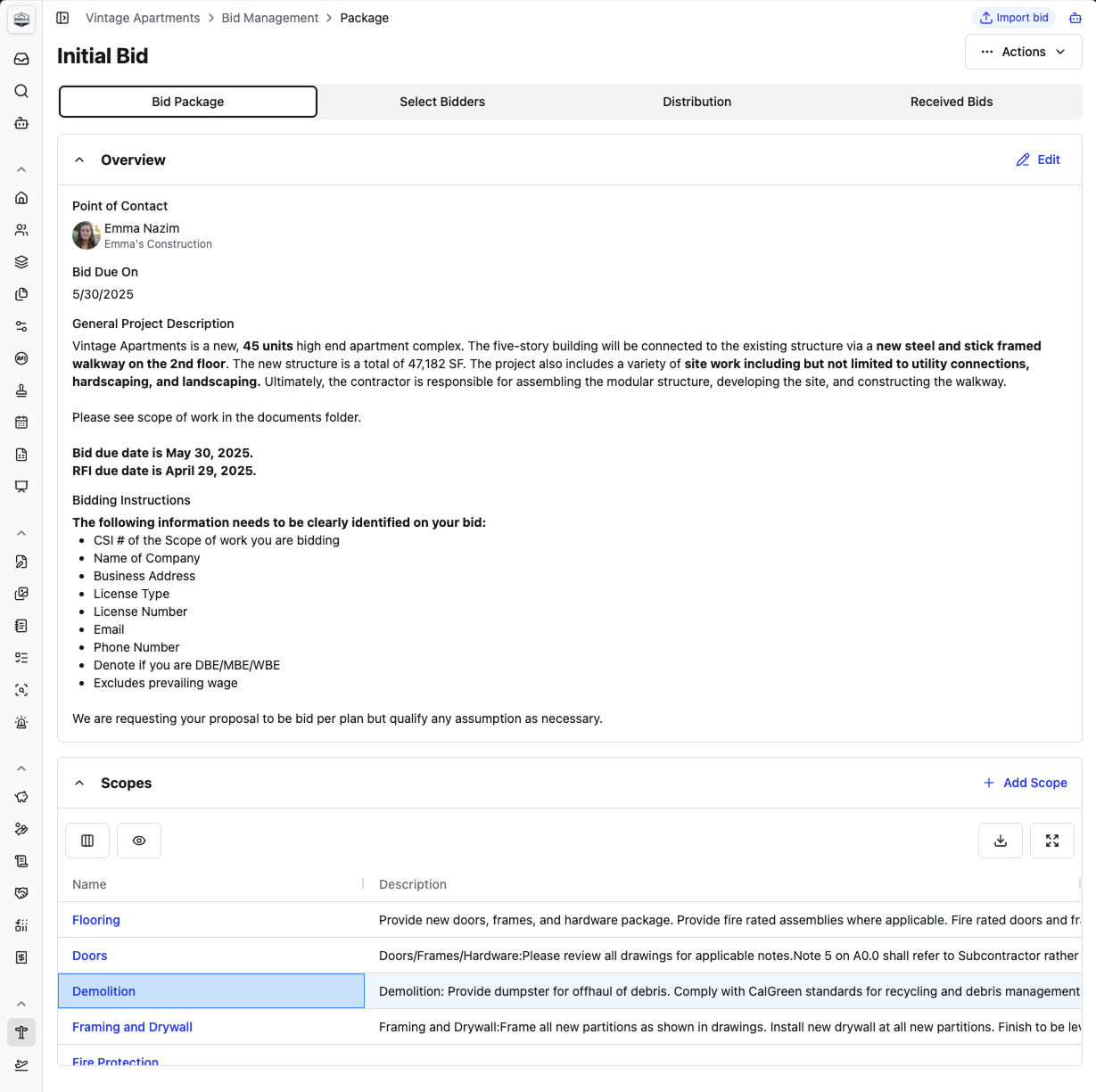
Constructable lets you fully define all your scopes as part of each Bid Package in the Bid Management feature, with inclusions, exclusions, and any additional scope-specific attachments you want to add. Bidders get to specify their number for each of the specific Scopes you've invited them to bid on, making bid leveling that much more straightforward.
Common bid leveling mistakes and how to spot a risky low bid
The mistakes repeat across packages, and each one lets a gap through:
-
Comparing totals before confirming scope coverage.
-
Accepting incomplete or non-conforming bids into the grid as-is.
-
Ignoring qualifications and lead times that carry real cost.
-
Awarding the low number without confirming the sub priced the full package.
Spotting a risky low bid takes a few signals. An outlier far below its peers usually means missing scope, not a sharper pencil. Blank line items point to work the sub never priced. Vague exclusions ("standard scope only") hide what got left out. When these show, call the bidder before you award.
Manual vs. software-based bid leveling
Spreadsheets work for a handful of packages a year. The math breaks at volume. Picture bid day with 30-plus packages and over a hundred PDFs on a two-day clock, and the exclusion you miss is arithmetic, not carelessness. Formula-driven sheets are prone to error at volume, and a missed line at that scale compounds into cost overruns long before anyone notices.
Software and AI tools handle the mechanical work: reading PDFs, pulling scope and pricing into a grid, flagging exclusions, and normalizing bids for a like-for-like view. What they cannot do is make the call. Confirming a qualification, weighing lead time against your schedule, deciding which sub gets the award: that judgment stays with the estimator.
Bid leveling software and tools to consider
Software that supports bid leveling falls into a few categories. Dedicated bid management systems like BuildingConnected center on structured intake and side-by-side comparison. General construction management software such as Procore folds leveling into broader project tools. Estimating tools lean on takeoff and pricing.
When you weigh any of them, look at four things:
-
Whether bids arrive in a structured format instead of loose PDFs
-
How the tool normalizes columns side by side
-
Whether it flags scope gaps automatically
-
How bids get collected before leveling even starts
How Constructable fits into the bid leveling workflow
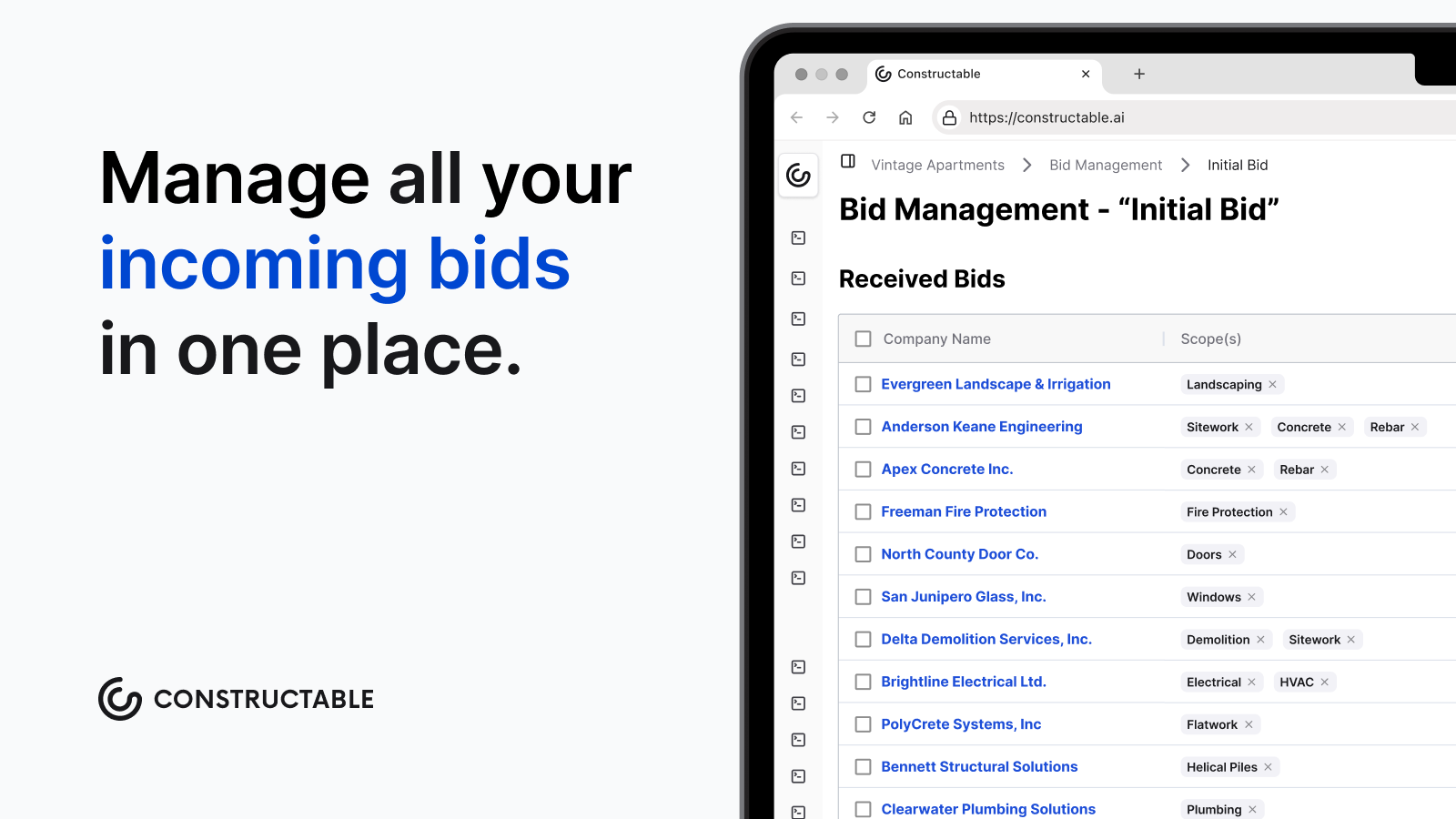
Constructable is a connected system for mid-size general contractors that organizes the front end of this workflow. Inside Pre-Construction bid management, teams build bid packages by scope, capture per-scope amounts per bidder, give bidders a landing page to submit online, and track bidder status and communication history in one place.
To be clear, as of October 2026, Constructable does not yet perform automated leveling or side-by-side comparison, so leveling stays a manual step you'll run against organized bids.
The value is upstream though. When every bid, drawing set, and communication thread lives in one system, the scope context you rely on sits in one place, feeding real-time project cost and commitment visibility, instead of scattered across email and folders.
Final thoughts on getting bid leveling right
Leveling turns a pile of PDFs into an apples-to-apples read, so the bid that looked cheap stops fooling you once the exclusions get added back. Confirm scope, adjust the numbers, then make the call on schedule and risk. Take a look at how Constructable organizes the bids you level against.
FAQs
What's the best way to level bids without a spreadsheet at high volume?
Dedicated bid management software is the better route once you're past a handful of packages a year, because formula-driven Excel and Google Sheets break down at volume. Tools like BuildingConnected center on structured intake and side-by-side comparison, while systems like Procore fold leveling into broader project workflows, but the estimator still makes the award call.
Does Constructable do automated bid leveling?
No. Constructable does not currently perform automated leveling or side-by-side comparison as of October 2026, so leveling stays a manual step you run against organized bids. The value is upstream: inside Pre-Construction bid management, teams build bid packages by scope, capture per-scope amounts per bidder, and track status and communication history in one place, so scope context sits together instead of scattered across email and folders.
Bid leveling template Excel vs PDF: which should I use?
Use Excel or Google Sheets as your workspace and reserve PDF or Word for the final record. Live formulas total adjusted bids as you type and conditional formatting flags blank scope cells, but PDF and Word lose the math on export, so treat them as output for owner review or the project file, not the place you do the leveling.
How do you spot a risky low bid during leveling?
An outlier far below its peers usually means missing scope, not a sharper pencil. Blank line items point to work the sub never priced, and vague exclusions like "standard scope only" hide what got left out. When these signals show, call the bidder and confirm assumptions in writing before you award.
What belongs in each bidder column on a bid leveling sheet?
See the bid leveling sheet section above for the full column breakdown: base bid, adjustments, alternates, adjusted total, and qualifications. That last row is where the low bid usually stops looking low, since a 20-week lead time can outweigh a lower dollar figure.