What's New
Things move fast. So do we. Keep up to date here.

Native Schedule Editing
Build and change project schedules in Constructable. Create and move Gantt activities, nest work, add milestones, and link dependencies.
Daily Log Custom Fields
Add per-project custom fields and custom sections on daily logs, and hide optional built-in fields you don't need.
Location Custom Fields
Use Location and Cost Code as custom field types so teams can pick project locations on forms.
Security Incidents
Log security incidents with a dedicated incident type and default fields.
Double-Ended Arrow Markup
Draw double-ended arrows on drawings.
Create List Items from Inspections
Turn an inspection item into a punch list item, prefilled with its title and observations.

Work Plans
Build and manage multi-week work plans with tasks, sign-off requirements, and hold points. Superintendents can plan upcoming work, track crew assignments by company, and ensure critical approvals are captured before work begins.
Callout Markup Tool
Add callout markups to drawings with text in a box and a leader arrow pointing to the target. Instead of drawing separate shapes, place a single callout that keeps the text readable and the arrow connected.
Search Drawing Contents
The Drawings search bar now filters sheets by their contents, not just sheet number and title. Search across OCR and embedded text to find the sheets you need, with results highlighted when you open them.
Manage Drawing Areas from Drawings Page
Create, rename, and delete drawing areas directly from the Drawings page. Manage your project's drawing structure without leaving the drawings workflow.
Reorder Drawing Revision Sets
Reorder published drawing revision sets when they were published out of sequence. Keep your revision history in the right order without waiting on support.
Inspection Template Library
Create reusable inspection templates at the organization level with sections, items, and response sets. Start new project inspections from any template instead of rebuilding the same inspection on every job.
Offline Drawing Downloads
Download entire drawing disciplines to your mobile device for offline access. Field crews can store full sets of sheets on their phones before heading into areas with no signal, with automatic updates when new revisions are published.
Group Drawing Review by Discipline
The drawing review page now groups sheets by discipline with bulk selection and confirmation. Confirm ready sheets in batches, see exactly which sheets need fixes, and track progress with discipline-level status bars.
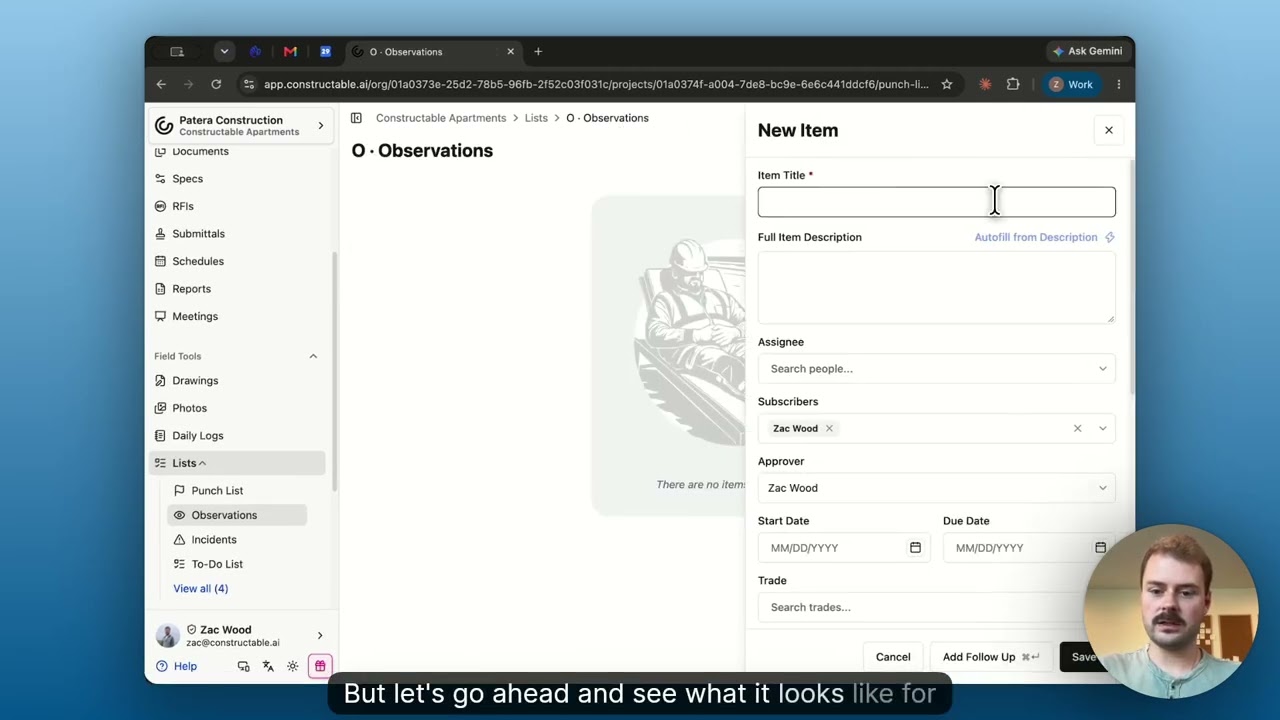
Custom Fields
Add new custom fields to your Lists and organize them into sections. You can add text, dates, selects, people, companies, and attachments so that each List item carries the specific details your organization requires.
Incident Management
Report and close project incidents from Field Tools, with configurable incident types, injury/near-miss/property/environmental records, and shared custom field layouts.
Limited Daily Log Entry for Subcontractors
Give trade partners Limited Daily Log Entry so they can submit their own people, hours, notes, and photos without seeing the full GC daily log.
Phone Calls on Daily Logs
Log phone calls on the daily log with caller cards, optional recording and transcript, AI summary, PDF output, and an organization report.
Drawing Areas as Tabs
On projects with multiple drawing areas, switch areas from tabs under the header (with sheet counts) instead of a dropdown, including clearer mobile tab scrolling.
For Record Submittal Status
Close and distribute a submittal with the official For Record status when the owner or architect needs a set on file without a formal approval.
Faster Drawing Set Review
Large sets open for review right away by loading detections for the current sheet only, instead of waiting on every detection in the set.
Filter Drawing Sheets by Publish Status
On a drawing set, filter the sheet list to Published, Unpublished, or All so you can focus review and publishing work.

Project Info Start, Completion, and Warranty Dates
Track estimated and actual start, actual and substantial completion, and warranty start/end on Project Info, and optionally show those dates as columns on All Projects.
Create People and Companies from Project Team
Add a new person or company right from Project Team without bouncing through the directory, then set project access in the same flow.
Commitment Names on Project Team
See each company's commitment name (or trade fallback) under Project Team so field and office roles know which subcontract they are looking at without opening financials.
Color-Coded RFI and Submittal Status
Status columns in RFI and Submittal tables use color badges so you can spot draft, open, closed, and cancelled at a glance.
Company Peers See Shared Punch Items
Teammates at the same company can see and move-to-review punch items assigned to a coworker, so trade partners are not blocked when only one person was named.
Generate Drawing Revision Report On Request
The first revision report (and broken-link check) runs when you choose Generate revision report, so publishing a set stays fast until you need the report.
iOS Opens PDFs in Native Viewer
Tapping a PDF chip on iOS opens it in the system viewer instead of the in-app web view, so large files are less likely to crash the app.

Schedule Lookahead
Build and edit a multi-week schedule lookahead with tasks, crew sizes, company colors, and calendars, then export a PDF for the field. Superintendents can plan the next few weeks and hand crews a printable look ahead without leaving Constructable.
Template Projects
Mark a project as a template, then create new jobs from it with folders, cost codes, bid packages, meetings, inspections, punch lists, and team memberships already set up. New projects start from your standard setup instead of a blank job.
Custom Fields on Incidents
Add organization-defined custom fields to incidents so safety and project teams capture the details your process needs. Track the fields that matter for your company beyond the default incident form.
Stack Contract Templates for E-Signing
When preparing a commitment for e-signing, add multiple contract templates so base agreements and addenda stack in order. Use Add template on Contract Documents to append each template without wiping prior documents.
Faster SOV Import from CSV or PDF
Schedule of Values import now accepts CSV or PDF and writes large AIA G703 sheets in one pass instead of stalling after a few dozen lines. Commitment SOV import is labeled Import CSV or PDF so financial teams can load full schedules without babysitting the run.
Organization WIP Report
Organization Reports now includes a WIP Report with each project's Over Billed, Under Billed, revenue, and cost totals. Financial teams can review work-in-progress across every job without opening each project's Budget page.
Invoice Approval Workflow
Project Settings now includes Subcontractor Invoice Approvals for a sequential list of approvers. Submitted vendor invoices show an Approval workflow with Approve and Reject, and final invoice approval waits until those steps finish.
Overlay PDF Export
Sheet overlay in the drawing viewer now uses Export to PDF to download the live comparison—ghost, highlight, or red and blue—as a one-page PDF. Teams can send a revision overlay to someone who is not in Constructable.
Unexecuted Commitment Warnings
Adding a vendor change order now warns when the commitment is not fully executed, or when that vendor already has an unsigned change order. Project teams can still add the order, but they see the risk before work stacks on an unsigned subcontract.
WIP Report
The Budget page now includes a WIP Report view alongside Combined Budget and Budget vs Cost, with Over Billed and Under Billed columns plus revenue and cost percent complete. Financial teams can review work-in-progress billing by budget code and export the report as PDF or CSV.
Budget Cell Breakdown
Clicking a budget cell now opens a breakdown of the sources that make up that value, with Source, Amount, Description, and Total. Financial teams can see how a number is built—such as Prime SOV, Vendor Change Order, or Budget Modification—without leaving the grid.
Certificate of Insurance Review
Organization Settings now includes a Certificate of Insurance section for a Review prompt and Notify organization users. Uploaded certificate PDFs can be checked against that prompt, and insurance attachments show Passed Review, Under Review, or Failed Review so teams can follow up without opening every file.
Agent Fullscreen
The Agent side panel on desktop now includes Expand panel to work fullscreen, with Exit fullscreen to return to the split view. Teams can give a chat the full window when reviewing a long answer, then go back to the page they were on.
Find Discrepancies
The Agent now includes a Find discrepancies skill that checks published drawings and specs for material conflicts. Project teams can start that review from Use a Skill instead of describing the scan from scratch.
Quantity and Unit Price on Line Items
Change order and SOV line items now include Qty, Unit, and Unit Price, with Amount calculated automatically. Financial teams can price unit-based work in the grid and on change order PDFs, and leave quantity blank for lump sum.
Custom Agent Skills
Teams can now create Custom Skills in the Agent and share them with the organization or keep them private. Repeatable prompts start from Add/Edit Custom Skills instead of rewriting the same instructions each time.
Drawing Revision Changes
Publishing a revised drawing set now generates a Revision changes briefing on Drawing Sets. Teams can open View revision changes to see what changed on each sheet, related records, and Broken detail links without comparing the set by hand.
Contract Merge Fields
Place Signature Fields now includes Merge fields that fill from project, organization, commitment, and signer data when a contract is sent or downloaded. Teams can stamp values like Project Address and Signer Name onto the PDF instead of typing those blanks by hand.
Bid Package Downloads
Bidding Resources now includes View Specs and Download All for a ZIP of drawings, specs, documents, and photos. Invited bidders can review the package in Constructable or download the full set without collecting files one by one.
Drawing Details
Drawings now include a Details tab that lists detected details from published sheets. Teams can filter by number or title and open a detail on the sheet without scanning the full set.
Folders With Files at a Glance
Document folders that contain files now show a filled folder icon, while empty folders stay outlined. Teams can see which folders have documents without opening each one.