Use this guide to build, schedule, perform, complete, export, and troubleshoot Inspections. It covers the exact controls and blocked states on desktop web, mobile web, and the native app.
Start here
- I create inspection programs: Understand the lifecycle → Create or import a draft → Build sections and items.
- I perform field inspections: Schedule and start → Record results and observations → Complete.
- I review records: Find inspections → Export a PDF.
- Something is missing or blocked: Start with Troubleshooting Inspections.
Common task recipes
- Build a reusable checklist: Create one inspection, add sections and items, then duplicate it for the next occurrence.
- Seed a new project: Import inspection structures from another project. Item results, observations, and item attachments are left behind.
- Perform the field walk: Move the inspection to Inspecting, mark each item Passed, Failed, or N/A, and add notes and photos.
- Issue a record: Complete the inspection and export its PDF.
Understand access and lifecycle
Understand how Inspections work
Every inspection moves through the same four statuses, and the one it's in decides what you can do to it.
Draft → Scheduled → Inspecting → Complete
An inspection holds an overview, trades, attachments, ordered sections, and ordered checklist items. Item results are recorded while the overall inspection is Inspecting — that one rule explains most of what you can and can't do at any given moment.
Each status answers a different question about where the inspection stands.
- Draft: Build the structure and overview.
- Scheduled: Set the inspection date and prepare for field work.
- Inspecting: Record Passed, Failed, or N/A on checklist items.
- Complete: Preserve the finished state for review and export.
If you have inspection write access, you can move to the next status or jump to any other one. Sending an inspection backward reopens it — a cancelled walk returns to Scheduled, a finished one returns to Inspecting for a correction. The status only ever shows where the inspection stands now, so once you've moved it backward, the activity log is the only place the real order of events survives.
Permissions, visibility, and platform availability
Inspections splits access three ways, and holding one permission without the others is normal rather than a sign something is broken.
- View inspections controls access to non-draft inspection records.
- Create new draft inspections controls creating drafts and seeing the draft group.
- Create new inspections, make changes to existing inspections controls structure, status, results, observations, duplication, rename, and deletion.
Administrators, managers, and employees receive these permissions by default. Your project may be configured differently, so check with your administrator before assuming a record has gone missing.
Note: Draft access and general view access are separate. Someone can be able to view every active inspection and still not see a single draft.
Once you have the access, everything in Inspections works on a phone. Browsing, recording results, writing notes, changing status, importing, duplicating, and exporting the PDF are all available on desktop web, mobile web, and the app.
- The result controls are three icon buttons, not words: a check for Passed, an X for Failed, and an N/A glyph for Not Applicable. On a phone they're taller so they're easier to hit with a glove on.
- Building a long checklist works on a phone but is miserable there. Do structure work at a desk and save the phone for the walk.
- On desktop, the create control is a Draft Inspection button with a chevron beside it holding Import from Project. In the app it's a Draft button whose menu holds New Draft Inspection and Import from Project.
Troubleshooting Inspections
Nearly everything that looks broken in Inspections is one of three things: a permission you don't have, a status that disables the control you're reaching for, or an import behaving exactly as designed. Find your symptom and work through the checks in order.
A draft is missing
Confirm you have Create new draft inspections. Drafts are shown separately from active inspections, and general inspection view access doesn't reveal them.
Pass, Fail, and N/A are disabled
They aren't greyed out — outside Inspecting they're not drawn at all. An item that already has a result shows a Passed, Failed, or Not Applicable badge in their place, and an item with no result shows nothing. So a checklist that looks empty and unclickable usually means the inspection hasn't been started yet.
Move it to Inspecting and confirm you have Create new inspections, make changes to existing inspections. You need both.
Imported observations or photos are missing
That's the design rather than a failure. Import copies inspection structure, sections, and items as new drafts, and intentionally leaves item results, observations, and item attachments behind.
The wrong people or date appear
Check the inspection overview — inspected-by user, inspection date, trades, and description all live there. Correct the overview before you export.
Export is missing
Export to PDF sits in the inspection's ⋯ menu. Confirm you have View inspections, and if the inspection or its attachments are still syncing, wait and retry.
Status changed unexpectedly
Anyone with write access can choose statuses from the status menu, including earlier states. Review the activity area and confirm the intended current status.
Plan and build
Understand the inspection lifecycle
The status on an inspection tells everyone where it stands: writing the checklist, waiting on a scheduled walk, recording results in the field, or holding a finished record. Knowing what each status is for keeps you from completing work nobody has actually checked.
Prepare your sections and checklist wording while the inspection is in Draft. Nothing is expected of anyone else yet, so this is the cheap moment to get the wording right. Set the date and the responsible inspector before you move it to Scheduled.
Move to Inspecting when you're ready to enter results. That's the status where item results are recorded, so an inspection sitting in Scheduled with no Pass and Fail controls on screen isn't broken — it just hasn't started yet.
Move to Complete after you review unresolved failures and the supporting evidence. Completing is where the record stops being a working document and becomes the thing you export.
Note: An Inspection is different from an inspection entry in a Daily Log. Use this workflow when you need a reusable, structured checklist with its own lifecycle and PDF.
Why can't I mark items Passed or Failed yet?
Item results are recorded while the overall inspection is Inspecting. Move the inspection into that status, confirm you have inspection write access, and the controls appear.
What does moving an inspection backward do?
It reopens the inspection, which is genuinely useful when a walk gets cancelled or a result needs correcting. Just know the status only shows where things stand now — once you've moved backward, the activity log is the only record of what happened in what order.
Match the status to the work in front of you and the controls you need are the ones on screen.
Create, import, or duplicate an inspection
You have three ways to start an inspection, and the one you pick decides how much retyping you avoid and how much stale evidence you drag along. Every route lands you in a Draft, so there's room to check the result before anyone walks it.
Create a draft
- Open Inspections.
- Select Draft Inspection. In the app, select Draft and then New Draft Inspection.
- Enter a title. That's the only field the dialog asks for.
- Save the draft.
The date, trades, inspected-by user, and description all get filled in afterward, on the draft's overview. Starting from scratch makes sense for a one-off check or the first inspection of a new type. If you're about to retype something this project or another one has already been through, one of the next two routes is faster.
Import structures from another project
- Select the chevron beside Draft Inspection, or the Draft button in the app.
- Choose Import from Project. The Import Inspection Structure dialog opens.
- Select the source project.
- Select Import.
This brings over every inspection in the source project, not a selection, so point it at a project whose checklists you actually want wholesale. Each arrives as a new Draft carrying its title, description, trades, sections, and items.
What doesn't come across is the previous project's evidence: item results, observations, and item attachments are all left behind, which is the point — you're taking the checklist, not the findings.
Note: Overview attachments are copied, even though the dialog's wording suggests no attachments come along. If the source inspection had a spec excerpt or a site map attached at the inspection level, check whether it still applies before you schedule the copy.
Duplicate one inspection
Open an inspection's action menu and choose Duplicate Inspection. You get a Draft with the same title, description, trades, and checklist, dated today.
The results don't come with it. Item pass/fail marks, observations, and item attachments all start clean, and the inspected-by user is cleared so you can assign whoever is walking it this time. Overview attachments do carry over.
Before you schedule the copy, give the title a distinguishing date or area — duplicating a recurring inspection five times leaves you with five identically named records otherwise.
Should I import or duplicate?
Import when you're seeding a project and want another project's checklists wholesale. Duplicate when this project already contains the inspection you want to run again.
Do photos and results come along with a copy?
No, and that's deliberate. Item results, observations, and item attachments stay with the original either way. Overview attachments do carry over, so give those a read before the copy goes out.
A minute spent choosing the right starting point saves an afternoon of retyping, and keeps last month's findings out of this month's record.
Build the inspection structure
The order of your checklist is the order someone walks the building. Build the sections and items while the inspection is a draft so the inspector reads straight down the page instead of doubling back to find the next check.
- Open a draft.
- Complete the overview: title, description, inspection date, trades, inspected-by user, and general attachments.
- Select Add Section.
- Name the section for an area or system.
- Add checklist items with clear pass criteria.
- Move sections and items up or down to match field sequence.
- Remove unused items or sections.
Write each item as something the inspector can observe. Firestopping is complete at rated penetrations gives a clear pass or fail; Firestopping leaves the field guessing what passing meant, and you find out months later that two people guessed differently.
Pro Tip: Name sections after the areas or systems your team already talks about — the walk then sequences itself, and the exported PDF reads like the route someone actually took.
How specific should a checklist item be?
Specific enough that two inspectors would agree on the result. If a reasonable person could mark the same condition Passed and another could mark it Failed, split the item or rewrite it.
What about checks that won't apply on every walk?
Leave them in the structure. The inspector can mark them N/A in the field, which keeps the checklist consistent from one occurrence to the next.
Build it once in the right order and every future run of this inspection inherits that sequence.
Find and open inspections
Open Inspections to find a record — a draft you're still writing, tonight's walk, or last month's finished report. The index keeps drafts, active work, and completed inspections apart so you aren't scrolling through history to reach the one that's still open.
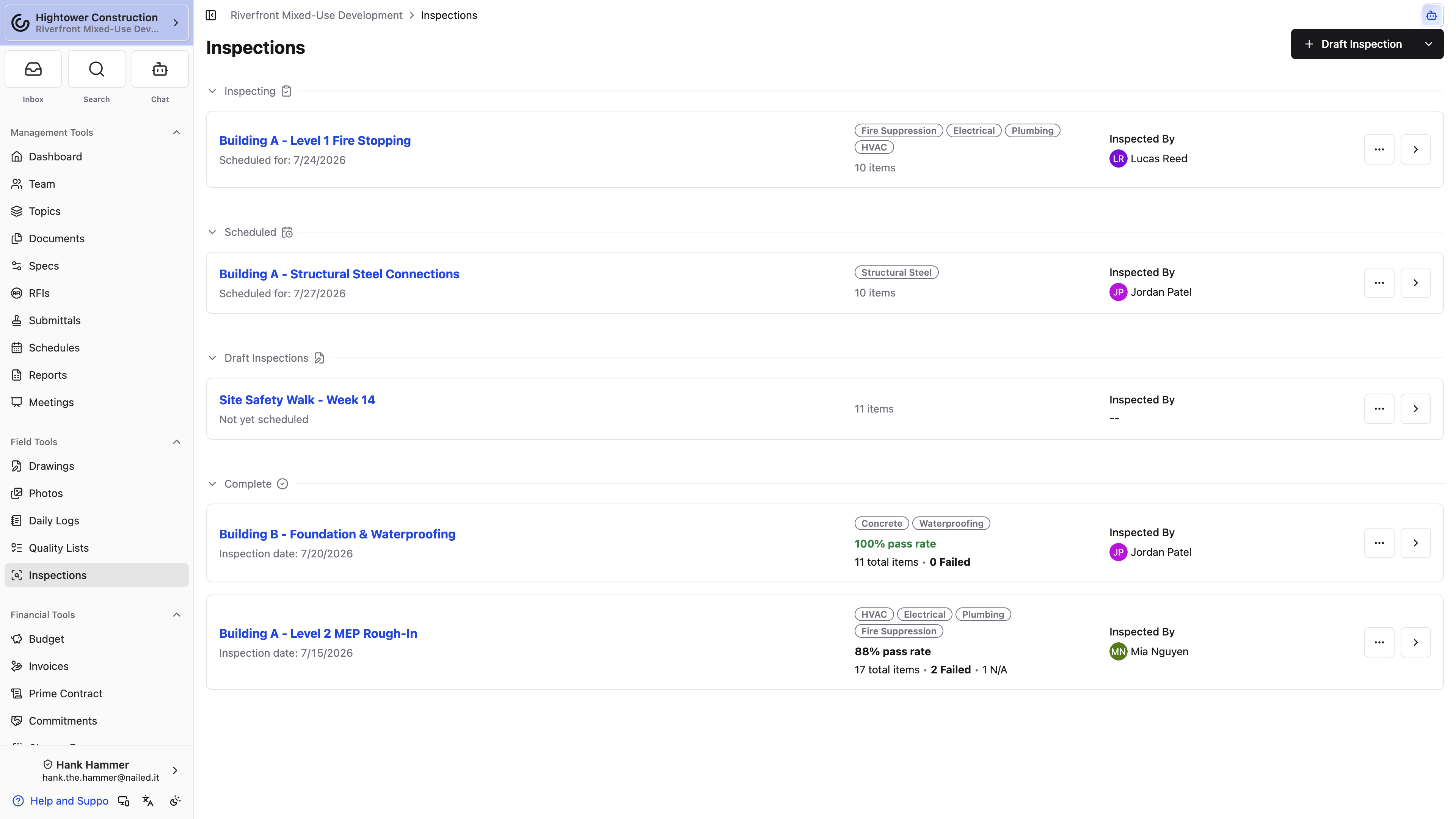
Inspection cards show the title, status, date, inspector, and trade context — enough to tell two similar inspections apart without opening either one. If you have draft permission, you can see drafts too. Open a record when you need its overview, sections, item results, attachments, or activity.
Once an inspection is complete, its card reports a pass rate, the total item count, the number failed, and the number marked N/A. That's enough to scan a column of finished inspections and see which need follow-up without opening any of them. The rate turns red below 90%.
Read that pass rate carefully, because of what sits in the bottom half of it. We divide passed items by every item except the ones marked N/A — which means items you left blank count against you. A twenty-item inspection with eighteen passes and two checks nobody ever marked reports 90%, not 100%. Marking a check Not Applicable removes it from the math entirely; leaving it blank does not.
Why don't I see any drafts?
Draft visibility is its own permission. Ask your administrator to check Create new draft inspections; general inspection view access doesn't include the draft group.
Does an N/A item count against the pass rate?
No. An item marked Not Applicable comes out of both halves, so it never lowers the rate. A blank item is different — it stays in the denominator and pulls the rate down as though it had failed. Finish the list before you complete the inspection.
Scan the index once and you know which inspections are waiting on you and which finished ones need follow-up.
Inspect and report
Schedule and start an inspection
Move the record into field work once the checklist, the date, and the responsible inspector are ready. Scheduled says the walk is set; Inspecting is the status that actually lets you record results, so start it when you're on site.
- Open the draft.
- Confirm the inspection date and inspected-by user.
- Select Schedule Inspection.
- At the field event, select Start Inspecting.
- Work through the checklist in order.
Step 2 isn't busywork. The inspected-by user and the inspection date both print on the exported PDF, and a wrong name or date is the most common reason someone has to correct the overview and export a second time.
The status menu isn't a one-way ratchet. Any status can be selected from it at any time, so a cancelled walk can go back to Scheduled and a completed record can return to Inspecting for a correction. That flexibility is deliberate, but it does mean nothing stops you from jumping to Complete before results are entered — so don't, or the inspection will report a pass rate it hasn't earned.
Can I go back to Scheduled after starting?
Yes. Any status can be selected from the status menu at any time, so a cancelled walk can return to Scheduled without any special handling.
Pass, Fail, and N/A are greyed out. What's wrong?
They're not greyed out — outside Inspecting the buttons aren't rendered, so an unstarted checklist looks inert rather than disabled. The inspection has to be in Inspecting and you need Create new inspections, make changes to existing inspections. Both, not either.
Start it this way and the record carries the right date and the right name before the first item is marked.
Record item results, observations, and attachments
This is the walk itself. Record a result for each item and keep the evidence beside the check it supports, so the finished record explains itself to someone who wasn't standing there with you.
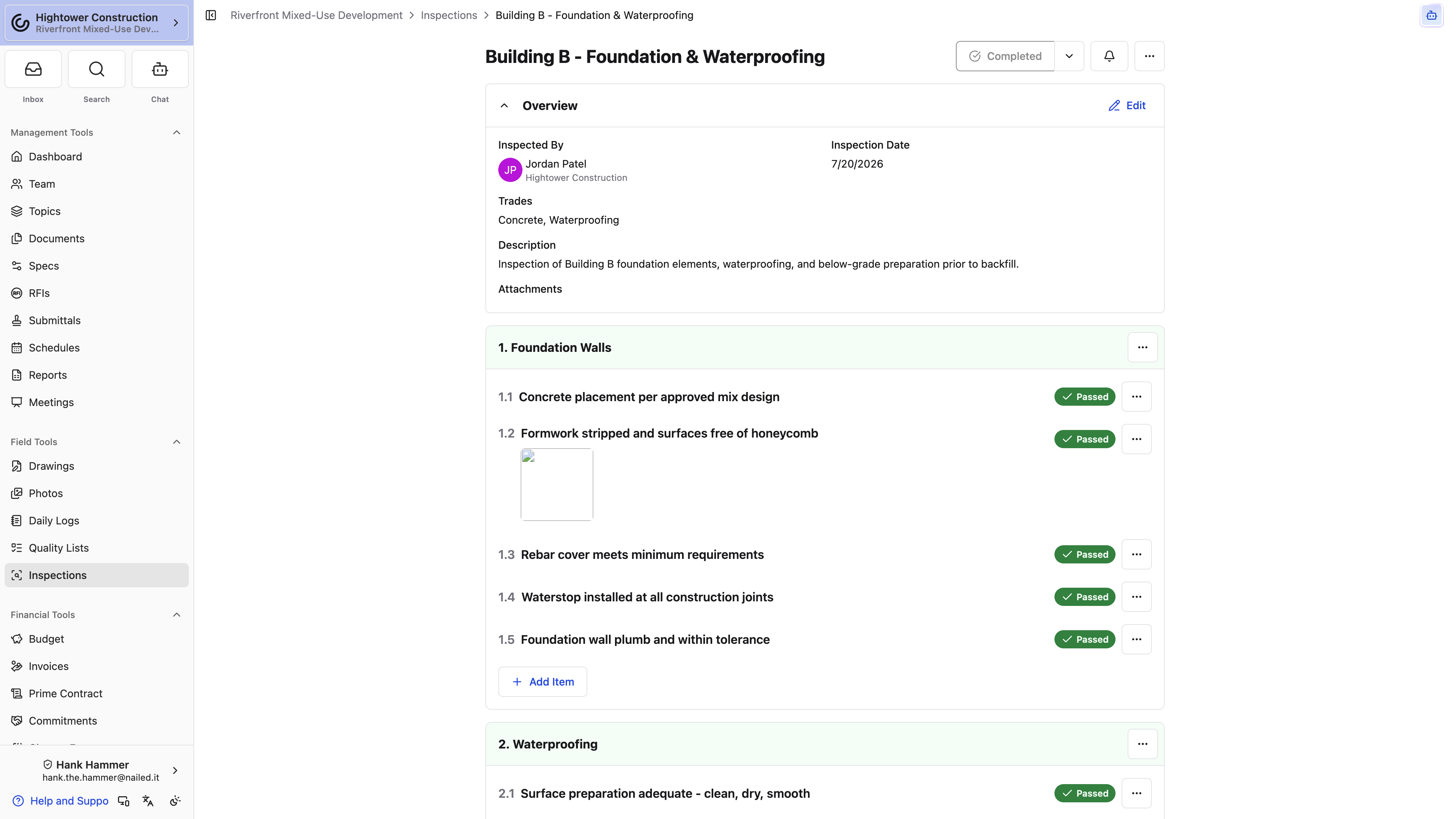
Each item carries three icon buttons rather than labels. The check mark is Passed, the X is Failed, and the third glyph is Not Applicable. Whichever you tap turns solid, so you can see at a glance which lines are done.
- Tap the check when the criterion is met.
- Tap the X when it isn't. The notes sheet opens on its own so you can explain the failure.
- Tap N/A when the check doesn't apply here.
- Add observations, notes, photos, or files to the item.
- Leave a result blank only when the check genuinely hasn't been performed yet.
A blank result and an N/A say different things, and the pass rate treats them differently too. Not Applicable comes out of the calculation entirely. A blank stays in it and counts as a miss, so a checklist you never finished reports a worse number than the walk deserved. Spend the extra tap.
Pro Tip: Put general inspection attachments in the overview and item-specific evidence on the item. Keeping them separate is what makes the final PDF easy to follow instead of a pile of photos with no home.
The notes workflow opened by itself. Is that a bug?
No. Marking an item Failed opens it on purpose, because a failure without an explanation is the one result nobody can act on later.
I recorded the wrong result. Can I change it?
Yes, while the inspection is in Inspecting and you have write access. If it's already complete, return it to Inspecting, correct the result, and complete it again.
Work through the list this way and every result on the record arrives with the evidence that justifies it.
Complete, reopen, or correct an inspection
Complete the record after you've checked the entire list and decided how each failure will be handled. Completing turns the walk into the record you'll export and hand off, so it's worth one last read-through first.
- Review every section for blank results.
- Review failed items and their observations.
- Confirm overview details and attachments.
- Select Complete Inspection.
Step 1 is the one that gets skipped, and it's the one that costs you. Blank results stay in the pass-rate denominator, so completing an inspection with three unmarked items publishes a number lower than the walk earned — and everyone scanning the index sees it. Mark them Not Applicable if they didn't apply, or go back and check them.
Note: A completed inspection still shows every result you recorded, as Passed, Failed, and Not Applicable badges. The tappable buttons disappear outside Inspecting, which is why the list looks different once you complete it. Nothing has been lost, and it isn't a permission problem.
Need to fix something? Return the inspection to Inspecting, make the change, and complete it again. You can use the activity area to understand later changes, which is exactly why correcting the record beats quietly working around it.
I completed it before the results were in. What now?
Send it back to Inspecting, finish the items, and complete it again. Everything you already recorded is still there.
Can anyone tell the record changed after it was completed?
Use the activity area on the inspection — that's where later changes are visible.
Complete it deliberately and the exported record matches what actually happened on site.
Export an inspection PDF
When the inspection needs to leave Constructable — for an owner, a subcontractor, or the closeout binder — export it as a PDF. You get a portable record of the overview, checklist, evidence, and results in one file you can share or retain. This works from a phone as well as a desk.
- Open the inspection.
- Open the ⋯ menu.
- Choose Export to PDF.
- Wait for generation and download the file.
The PDF includes status, inspected-by user, date, trades, description, overview attachments, sections, item results, observations, and item photos. That's a substantial slice of the project in a single file.
Note: Review the PDF for restricted or sensitive content before you distribute it outside Constructable.
Export to PDF isn't in the menu. Why not?
It lives in the inspection's ⋯ menu, so check there first. If it's genuinely absent, confirm you have View inspections; if the inspection or its attachments are still syncing, wait and retry.
The PDF shows the wrong inspector or date.
Both come from the inspection overview, along with trades and the description. Correct the overview and export again.
Export it and the inspection travels as one file that stands on its own.
Delete inspection content
Deletion comes in three sizes here — one item, one section, or the whole inspection — and the safest habit is to remove the smallest thing that fixes the problem. Save deleting the full record for inspections that should leave active use entirely.
- Delete an item to remove one checklist check.
- Delete a section to remove that section and every item in it.
- Choose Delete Inspection from the ⋯ menu to remove the full record.
All three confirmations say the same thing, and it's true: the action can't be undone. There's no archive and no recycle bin. Before you delete anything, read the observations and attachments hanging off it — they're often the only place a field condition was ever written down. Export the PDF first if there's any chance you'll want the record back.
If the problem is a mistake rather than something that has to disappear, rename the inspection or edit the structure instead.
Pro Tip: When the existing record must remain as a reference, duplicate it before making substantial changes and work on the copy.
I only need to remove one check. Do I have to delete the section?
No. Delete the individual item. Deleting a section removes that section and its active items, which is more than you asked for.
Should I delete an inspection or rename it?
Rename or edit when the record is basically right and just mislabeled. Delete only when the entire inspection should leave active use.
Remove the smallest thing that fixes the problem and the project keeps the history it will need later.