Use this guide to set up Lists, capture field issues, assign corrective work, review and complete items, export reports, and troubleshoot blocked actions. It covers desktop web, mobile web, and native-app behavior.
Start here
- I set up quality workflows: Choose a list type → Create a list → Create templates.
- I record field issues: Add a list item → Add evidence and drawing locations.
- I perform corrective work: Work assigned items → Move work through review.
- I approve work: Review status and evidence → Export the list.
- Something is missing or blocked: Start with Troubleshooting Lists.
Common task recipes
- Run a punch walk: Create a Punch List, add items with location, trade, assignee, approver, due date, and photos, then send each item through review.
- Jump straight to a list you use daily: Expand Lists in the project sidebar and select it from the shortcuts underneath.
- Give crews location access: Download location QR codes, post them in the field, and scan a code from the app to filter or add items at that location.
- Reuse a standard checklist: Manage templates on desktop, then choose a template while creating items.
- Issue a report: Filter the list down to the items you want, then export a PDF with or without item photos.
Understand access and workflow
Understand how Lists work
A list is a collection of work you found on a walk, and a list item is one piece of that work. Assignment, review, and reporting are all things that happen to an item between the moment you spot it and the moment someone signs off on it.
List → list item → location and evidence → assignee → In Review → approver → Completed
The list is also what sets the type, and the type changes what we call the items — Punch Item, Observation, Incident, or To-Do. Choose it before people start adding work.
Everyone attached to an item has a distinct job. The assignee does the work, the approver decides whether it's acceptable, and subscribers just follow along. Items can also carry drawings, comments, attachments, trades, dates, and follow-up work, so the whole story stays in one place.
Two vocabularies describe the same thing here, and knowing where each one shows up will save you a search. The tool is called Lists. Configuration, exports, and Inbox say "punch" instead. If you're looking for one of these and can't find it, search for the word in the right-hand column:
| Where you are | What it's called there |
|---|---|
| Project navigation and the list index | Lists |
| Project Settings > Roles and Permissions | Punch Lists, with actions like View punch lists and Move punch list items to review |
| The PDF export dialog | Export Punch List PDF |
| A Closeout package's section list | Punch List |
| The Inbox Type filter | Punch List |
This holds no matter which list type you're working in. An Observations list's permissions still read "punch list items," and its PDF still comes out of a dialog titled Export Punch List PDF.
Reach a list from the project sidebar
If you live in one or two lists all day, you don't have to go through the index every time. In a desktop browser, Lists in the project sidebar expands into shortcuts that take you straight into a list.
Select the chevron next to the Lists label under Field Tools to expand it — the notification badge stays on the right, like the other tools. Underneath you'll find:
- Up to four open lists, oldest first, each with its list-type icon and that list's notification count.
- View all, with the total in parentheses, which opens the Lists index. It also shows the notification count for lists that aren't in the shortcuts.
The badge on Lists itself is the project total. The shortcuts show open lists only, so an archived list never appears there — use View all to reach it. The count beside View all is every list on the project, archived ones included, which is why it's often higher than the number of shortcuts above it.
Constructable remembers whether you left the section expanded or collapsed, and it starts collapsed until you open it.
Note: These shortcuts are a desktop-browser convenience. In the app, Lists goes straight to the index, and you pick the list from there.
Why isn't the list I want in the shortcuts?
Either it's archived, or four older open lists are ahead of it. The shortcuts are the four oldest open lists, not the four you visit most, so use View all for anything else.
Expand it once and your daily list is one click from anywhere in the project.
Permissions, visibility, and platform availability
If you can see a list but not its items, or you can move your own work to review but can't mark anything complete, that's permissions working as configured. Under Punch Lists in Project Settings, four separate actions control this, and having some but not others is completely normal.
- View punch lists shows you the lists themselves.
- View punch list items shows you the work inside them. This is separate from the one above, which is why an empty-looking list is usually a permission rather than an empty list.
- Add new punch list items, make changes to existing punch list items covers creating items, editing any field, and setting any status including Completed.
- Move punch list items to review lets an assignee hand their own work off for inspection without granting them the ability to approve it.
Three of those four also carry a scope dropdown that decides how much you see, and that's where most of the confusion lives:
- Level of punch list access is either All Punch Lists or Only punch lists where I'm an approver, assignee, or subscriber.
- Level of punch item access is either All Punch Items or Only punch items where I'm an approver, assignee, or subscriber.
- Level of move to review access is either All Punch Items or Only punch items assigned to me.
By default, admins, managers, and employees get all four actions at the All scope. Subcontractors, consultants, and owners get the two view actions and move-to-review, all at the restricted scope, and none of the write action — so they see their own work, can send it for review, and can't approve it.
Those are just the defaults, though. Your project may be set up differently, so if what you're seeing doesn't match this, check with your Admin before assuming something is broken.
Note: Being a subscriber changes what you can see and what you're notified about. It doesn't make you the assignee or the approver.
Day-to-day item work goes anywhere you do — the app and web both handle creating items, adding photos, and moving work through review. Setting up lists and reporting on them is browser work.
- The app gives you a compact item list, detail pages, a floating Add Item button, and a header ⋯ menu with Add Item and Export all to PDF.
- Web gives you the data grid and its Actions menu, which is where Bulk Actions, Download as PDF, Download as CSV, and Manage Templates live. None of that exists in the app.
- New List and Download Location QR Codes sit on the Lists header on desktop only. The app puts both in its ⋯ menu instead.
- Sidebar list shortcuts are desktop-browser only.
- Mobile web is the gap. Once a project has at least one list, a phone browser gives you no way to create another one and no way to print QR codes — use the app or a laptop.
- Manage Templates never appears in the app. Tapping template management there returns you to Lists.
- Scanning a location QR code needs the app, since it uses your camera.
Troubleshooting Lists
Most Lists problems come down to one of three things: an active filter, an archived list, or a permission you don't have. Find your symptom below and work through the checks in order.
A list or item is missing
Nine times out of ten it's a filter, not a deletion. Work through these in order:
- Clear the item status, location, and any other filters.
- Expand Archived — someone may have archived the list.
- If your access is restricted, confirm you're actually an assignee, approver, or subscriber on the item.
- Ask an Admin to check both list-view and item-view permissions, since those are separate.
Add Item is missing
The list has to be open, and your role needs Add new punch list items, make changes to existing punch list items. Archived lists won't take new work until someone unarchives them.
I can't move an item to In Review
Check that the item is assigned to you and that your role has Move punch list items to review. If its scope is set to Only punch items assigned to me, someone else's item won't move no matter what you do. Anyone with full edit access can change statuses regardless of assignment.
I can't mark an item Completed
Completing an item needs Add new punch list items, make changes to existing punch list items. Move-to-review on its own lets you hand work off for inspection, but it isn't an approval permission — that separation is deliberate.
Templates are missing
Manage Templates is a browser feature — tapping template management in the app just returns you to Lists. Open the list in a browser and confirm your role has Add new punch list items, make changes to existing punch list items.
A drawing marker or attachment is missing
You need access to both the list item and the drawing or photo it points at. Missing one hides the connection.
Note: A drawing pin is context for an item, not the item itself. Deleting the pin doesn't necessarily delete the item behind it.
Set up and capture
Understand Lists and list types
Every list has a type, and the type decides what your team sees on screen and in reports. Picking the right one up front saves you explaining later why the safety log calls everything a punch item.
- Punch List tracks deficient or incomplete work through correction and approval.
- Observations records what someone noticed in the field, which may or may not turn into assigned work.
- Incidents groups safety and other incident records.
- To-Do List tracks general project tasks that don't fit the other three.
Underneath, all four are the same machine — same assignment, statuses, attachments, and reporting. The difference is the vocabulary everyone reads.
You don't have to create any of these to get started. Every new project arrives with one of each already made — Punch List, Observations, Incidents, and To-Do List — so you can add your first item immediately and rename or archive whatever your team doesn't use.
Note: Choose the type before you start adding items, so nobody has to mentally translate "punch item" into "observation" while they work.
Get this right and your reports read like the work they describe.
Can I change a list's type after I've added items?
Yes. Edit the list and choose a different type. The item label updates to match, and the items themselves are untouched.
Do the four types behave differently?
No. They share the same statuses, permissions, notifications, and export behavior. The type is about clarity, not capability.
Create and manage a list
Make a separate list whenever the work belongs to its own phase, walk, area, or owner. It keeps assignments legible and means you can report on one walk without filtering around three others. Creating one takes a desktop browser or the app — a phone browser doesn't show the button.
- Open Lists.
- Select New List in the upper-right corner. In the app, open the ⋯ menu in the header and choose New List.
- Enter a clear name in List title, a required Prefix (for example
PL), and choose the list type. - Select Create List, then open the list.
The prefix is unique on the project and stored in uppercase. Constructable fills one in from the title as you type; change it if two lists would otherwise share the same letters. Item numbers on this list then display as the prefix plus a padded number — PL #001 — so a punch walk can call items without naming the whole title.
Be specific with names. Level 2 Owner Walk - 2026-07-24 will still make sense in October; Punch List 3 won't. If two walks need their own reports or need to be archived at different times, give them their own lists instead of building one oversized one.
Once the list exists, the ⋯ button on its row is where you find Edit List, Archive List or Unarchive List, and Delete List. On desktop that menu also carries Manage Templates.
Each list on the index carries a progress ring showing how much of it is finished — completed items over active ones, with drafts and templates left out of the math.
Note: The ring counts the items you can see. If your role is limited to items where you're the approver, assignee, or subscriber, your ring reflects your slice of the list, and a project manager looking at the same list will see a different percentage. Neither number is wrong; they're answering different questions. Use a manager's view when you're reporting overall closeout progress.
Pro Tip: Resist the urge to make one list per project. A list you can hand to a single trade or close out in a single walk is a list that actually gets closed out.
Named and scoped this way, a list is something you can hand to one trade and finish.
Create and use list item templates
If you find yourself typing the same item over and over — the same fire-caulking check, the same pre-drywall look — turn it into a template. You'll type it once and keep the wording consistent across everyone who uses it. Do this in a browser; the app has no template page.
- On a desktop browser, open Lists.
- Select the ⋯ button on the list's row and choose Manage Templates. Inside an open list, it's under Actions instead.
- Add a template with whatever's reusable: title, description, trade, dates, assignee, or approver.
- Head back to the list.
- Choose the template when you add an item or a follow-up, then fill in the location and job-specific evidence.
Note: Templates are starting points, not finished items. Give each new item a quick read before you save so last quarter's assignee or an expired due date doesn't quietly ride along.
Build them once at a desk and your crews get consistent items from a phone all season.
Create a list item
The person who fixes this probably isn't standing where you're standing. Give them enough detail to find the condition, understand what finished looks like, and prove it when they get there.
- Open the list.
- Select Add Item. In the app, it's the floating button in the lower corner, and it's also in the header's ⋯ menu.
- Enter a specific title and description.
- Choose a location and trade where they apply.
- Set start and due dates.
- Choose an assignee and an approver.
- Add subscribers who should follow the item.
- Attach photos, or pull in project photos you've already uploaded.
- Save.
You stay on as a subscriber automatically, since you created it — no need to add yourself. Anyone you @mention in the description is subscribed automatically too, so you don't have to mention someone and then remember to add them to the subscriber list.
Each item has a Number on its Overview. The list's Prefix plus that number is how the item shows up in grids, search, and exports.
If this item can't start until something else finishes, use Add Follow Up on the parent item to create the follow-on work. Follow-up items always live on the same list as their parent, so start from the parent rather than creating the item somewhere else and trying to link it afterward. The new item's start date is the parent's due date, and its due date is one week after that. You'll still pick a template — Select Template — the same way you do for a regular item. The linked parent shows as Follows on the child, and the parent lists its Follow-up items.
Pro Tip: Write the title the way you'd say it out loud on the radio. "Missing fire caulk at Level 2 north corridor penetrations" beats "Caulk issue" when someone is scanning forty items on a phone.
Let the description fill in the rest
Typing a full description and then re-entering the same facts into the title, location, and trade fields is busywork. Write Full Item Description the way you'd describe the condition to a foreman, then select Autofill from Description.
We read what you wrote and populate the location and the trade, and where the trade points clearly at one subcontractor we'll suggest the assignee too. The title only gets filled in if you left it empty, so if you already typed one it stays exactly as you wrote it. Everything stays editable — check it before you save, particularly the location, since a description that says "second floor east" can't tell which of two east rooms you meant.
Autofill needs a connection. In a basement or a dead zone the button is greyed out, and in some builds it loses its label and looks like a blank space next to Full Item Description. Nothing is broken — write the item out by hand, or save it and revisit once you're back on signal.
This is why it pays to dictate a rich description on your phone rather than typing a terse one. The more you say, the less you have to fill in.
Add evidence, comments, and drawing locations
Keep the evidence and the conversation on the item itself. The moment part of the story moves to text messages, the item stops being a record anyone can trust.
- Attach photos, videos, and files.
- Pull in existing project photos when the evidence is already in Photos.
- Use comments for updates, questions, and review context.
- Place or connect a List Item pin in the drawing viewer. That's the pin tool's name in the viewer toolbar; the record it creates is an item on one of your lists.
- Check Sheet Pins on the item to jump to the sheets it's associated with.
Write descriptions that hold up away from the drawing. A pin tells someone where the issue is, but the item still has to say what's wrong and what outcome you need — plenty of people will read it from a phone in a stairwell, not from the viewer.
For the drawing-viewer side of this workflow, see Working with Submittals and list items on drawings.
Keep it all on the item and the next person inherits the whole story instead of half of it.
Send reminders and manage notifications
Use the item's actions menu when an Open item needs follow-up or when you want to change the updates you receive.
- Send Reminder Notification appears on an Open item when you have permission to edit list items. The reminder targets the current assignee.
- This Item's Notification Settings controls your notifications for that item. It does not change the assignee, approver, subscribers, or their access.
- On web, notification settings are a primary item action. In the native layout, both the reminder and notification settings are in the item's actions menu.
If Send Reminder Notification is missing, confirm the item is still Open and that you have Add new punch list items, make changes to existing punch list items.
Assign, review, and report
Assign, follow, and filter list items
A hundred-item list is useless to everyone and urgent to no one. Roles and filters are how each person carves out the handful of items that are actually theirs.
Six fields do the sorting:
- Assignee owns the corrective work.
- Approver decides whether the result is accepted.
- Subscribers follow the conversation without owning anything.
- Trade groups items by responsible scope.
- Location groups work by where it is.
- Due Date drives what happens first.
On web, the data grid lets you stack filters — status plus assignee plus trade plus location plus dates — and bulk-edit whatever's selected if you have write access. The app trades the grid for a compact list and detail view, which is the right call on a phone, but it also means Actions, Bulk Actions, and the CSV download aren't there. Open the list in a browser when you need any of those.
Location options come from the Locations block in Project Settings, where they're arranged in tiers — Tier 1 might be a building, Tier 2 a floor, Tier 3 a room. Trade options come from your organization's trades, which an Admin manages in the Trades panel under Organization Settings. If the choice you need isn't in either list, that's a settings change rather than something you can type in on the item.
Change many items at once
Select the items you want, open Actions, and pick a bulk edit under Bulk Actions:
- Edit Due Date...
- Edit Assignee...
- Edit Approvers...
- Edit Status...
- Edit Trade...
- Edit Subscribers...
This is how you reassign a whole trade's work when a sub changes, or push a set of due dates after a schedule slip.
Note: With nothing selected, a bulk action applies to every item currently showing — the labels change to Edit All Due Dates and so on to warn you. That's genuinely useful when you've filtered down to exactly the right set, and genuinely destructive when you haven't. Read the action label before you confirm: if it says "All," check your filters.
Pro Tip: Filter to your own name plus Open before a walk. That's your list for the morning, and it's usually a lot shorter than it looks from the full grid.
Filtered down this way, a hundred-item list becomes the six things you can actually close today.
Move a list item through its statuses
An item's status is how everyone else knows whose turn it is. Keeping it current is the difference between a list that closes itself out and one that stalls with each side waiting on the other.
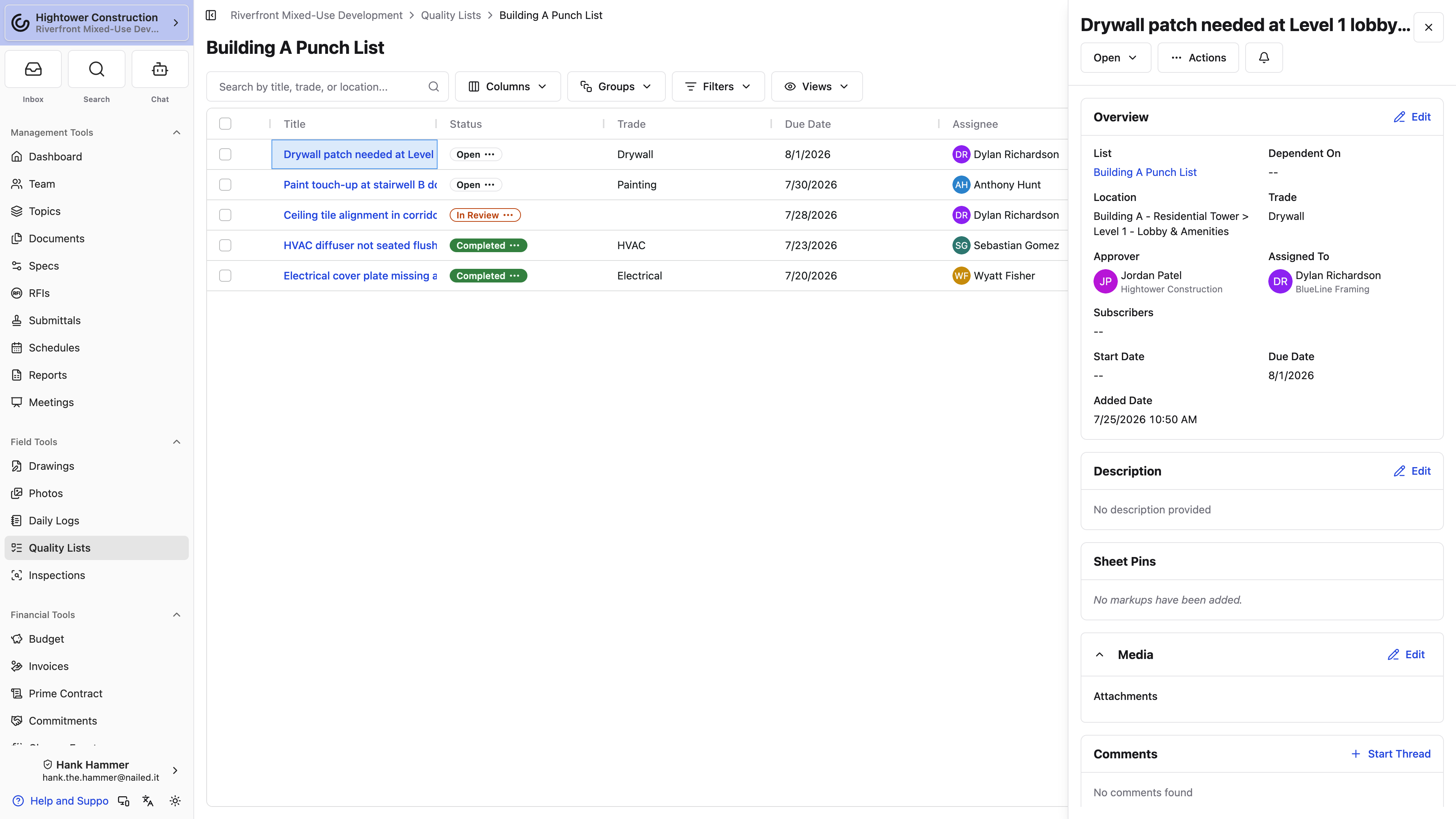
Open → In Review → Completed
- Open: Work is active, or it's been sent back for another pass.
- In Review: The assignee says it's ready to inspect.
- Completed: The approver accepted the result.
- Rejected: The review didn't accept it. Reopen it when more work is needed.
Leave the item Open while the correction is underway. Once the work is done, add a photo or two and a comment explaining what changed, then move it to In Review — that's the signal to the approver that it's their turn.
The approver walks the condition, checks it against the evidence, and marks the item Completed if it's accepted or Rejected if it isn't. Rejected work goes back to Open for another cycle. Nothing is lost, and the comment history shows why it came back.
Note: Completing an item isn't the same as photographing it. Save Completed for work that's genuinely been accepted through your project's review process, or your closeout reports will say things your walk won't back up.
Who can do what here depends on access. Anyone with Add new punch list items, make changes to existing punch list items can move items between any of the active statuses. Someone with only Move punch list items to review can hand off their own assigned work and no more. Status is also completely separate from whether the list is archived.
Kept current, the status column tells the whole team whose turn it is without anyone having to ask.
Why can't I mark my own item Completed?
Because move-to-review and approval are deliberately different permissions. You can tell the approver the work is ready; they decide whether it passed.
What happens to a rejected item?
It returns to Open for another correction cycle. All of its comments, photos, and history stay attached, so the next pass has the full context of why it came back.
Does archiving a list change its items' statuses?
No. Archiving is about where the list appears, not about the state of the work inside it.
Export a list
Export when you need to hand a list to someone who doesn't log in — a distribution for the trades, a record of a walk, or a package for turnover.
- Open the list in a browser.
- Apply filters first if the report should only cover part of the list.
- Open Actions and choose Download as PDF under Download As.
- In the Export Punch List PDF dialog, decide whether to include item photos.
- Generate and download the PDF.
You'll get titles, due dates, statuses, assignees, trades, non-image attachments, and optionally the photos. Since the export follows whatever filters are active, take one look at the list on screen before you generate — that's your table of contents.
Note: Before you send an export outside Constructable, scan it for items that were restricted inside the platform. The PDF has no permissions once it leaves.
Under Download As you'll also find Download as CSV, which is the one you want when the list is headed for a spreadsheet. It carries the grid's columns — title, status, trade, location tiers, due date, assignee, approver, description — and no photos. Use the PDF when the pictures are the point and the CSV when the sorting is.
Either way, someone who will never log in gets the same list you're looking at.
Report across every list on the project
An export covers one list. When the question spans all of them — everything still open, everything assigned to one sub, everything overdue in one area — use List Report under Management Tools → Reports instead. It puts every list item on the project in one grid you can group by List, List Type, Trade, Assignee, Status, Due Date, or location, and it leaves out drafts and templates. All Lists in Global Reports does the same thing across every project. See Use the List Report.
Post QR codes at the locations themselves
Download Location QR Codes produces a printable PDF with one code per page, each captioned Scan to open items and actions for this location. Tape them up at the door and anyone with the app can scan straight into that location's items instead of hunting through a list on a phone. The button is on the Lists header on desktop, and in the header's ⋯ menu in the app.
From that location menu — or after scanning a code — Save on a new item keeps the sheet open on the same list and location so you can add the next one without scanning again. Close the sheet when you're done with that spot.
Note: This exports codes for every location in the project, not just the ones used in the list you're looking at. Print the pages you need.
Why does my export have fewer items than the list?
Exports respect your active filters. Clear them and export again if you meant to include everything.
Can I export from my phone?
From the app, yes, but only the PDF: open the ⋯ menu and choose Export all to PDF or Export selected to PDF. There's no CSV and no filter grid, so anything precise should be set up in a browser first.
Archive or delete lists and items
Archiving and deleting sound similar and aren't. Archiving tidies a finished list away and keeps every bit of it. Deleting destroys it. Almost always, you want to archive.
All four of these live on the ⋯ button on the list's row.
- Archive List pulls the list out of the open group and stops new-item work, while keeping it available under Archived.
- Unarchive List brings it back into active use, exactly as it was.
- Delete List deletes the list and every item in it. The confirmation says so, and there's no undo.
- Delete Item deletes a single item, along with its comments, photos, and history. Also no undo.
Archiving is the natural end of a list's life. The walk is done, the record survives, and your Lists page stops showing you work from three phases ago. An archived list also drops out of the sidebar shortcuts, which is half the point.
Note: Before deleting an item, look at what's hanging off it — comments, attachments, drawing pins, and anything marked as follow-up work. If other items follow this one, the confirmation asks whether to Delete All Follow-up Items or Remove Follow-up Links. Read that choice before you confirm.
Can I get an archived list back?
Yes. Open Archived and unarchive it. Everything comes back as it was.
Should I delete a list once the project closes out?
Usually not. Archive it instead — closeout is exactly when you want the record to still exist, and a Closeout package pulls its Punch List section from lists that are still there.